Adding Azure Compute Account Fails With "This server does not seem to have Azure PowerShell installed"
| KB ID: | 4389 |
| Product: | Veeam Backup & Replication |
| Published: | 2022-12-22 |
| Last Modified: | 2025-03-17 |

Get weekly article updates

Challenge
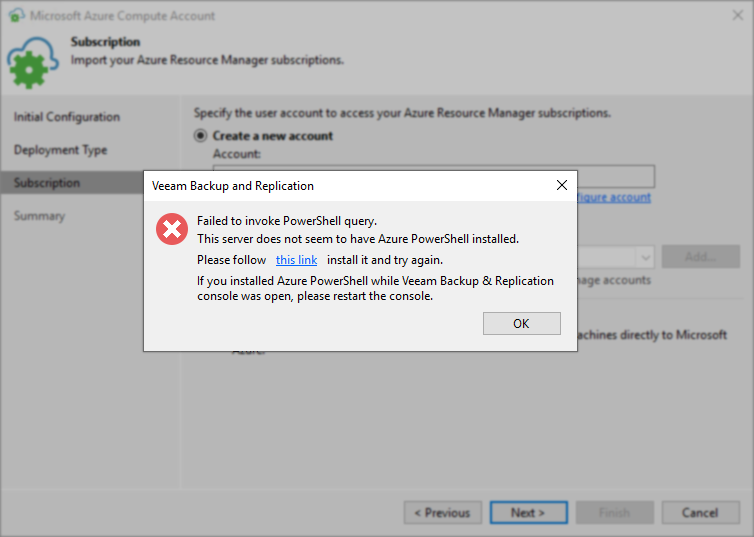
When attempting to add an Azure Compute Account using the "Create a new account" option, the error message is shown stating that "This server does not seem to have Azure PowerShell installed." even though the Azure PowerShell is installed.

Cause
The persistence of this error, even after installing the Azure PowerShell package, appears to be related to the OS blocking the execution of the signed PowerShell Modules within the Azure PowerShell package.
Solution
- Open PowerShell With Admin Privileges
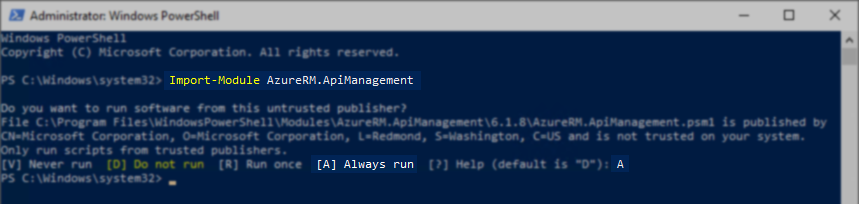
- Execute the following PowerShell command:
- Press A, and hit Enter to allow the script to Always Run.
- Reattempt the "Create a new account" operation within Veeam Backup & Replication
If issues persist, please collect logs for the Veeam Backup Server and include them on a support case.
More Information
The link in the error message installs a specific version of Azure PowerShell that is included with Veeam Backup & Replication and is located here (default location):
C:\Program Files\Veeam\Backup and Replication\Backup\Azure-Cmdlets-6.13.2.24245-x64.msi
If this KB article did not resolve your issue or you need further assistance with Veeam software, please create a Veeam Support Case.
To submit feedback regarding this article, please click this link: Send Article Feedback
To report a typo on this page, highlight the typo with your mouse and press CTRL + Enter.
Spelling error in text

KB Feedback/Suggestion
This form is only for KB Feedback/Suggestions, if you need help with the software open a support case