How to Change Veeam Service Provider Console UI Language
| KB ID: | 4544 |
| Product: | Veeam Service Provider Console | 8.0 | 8.1 | 9 | 9.1 | 9.2 | 9.3 |
| Published: | 2024-01-30 |
| Last Modified: | 2025-12-01 |

Get weekly article updates

Veeam Service Provider Console 9.1 Integrated Feature
Starting with Veeam Service Provider Console 9.1, the ability to assign and customize the Portal Language is now an integrated feature able to be configured via the Web UI:
Veeam Service Provider Console 9.1 - Configuring Portal Language
Article Applicability
This article was initially published for Veeam Service Provider Console 8 when this feature was in the preview stage and required manual configuration file manipulation. The content of this article will remain until Veeam Service Provider Console 8 reaches End of Support in December 2026.
Purpose
This article documents how to customize the locale file in Veeam Service Provider Console 8 or newer, which controls the words and phrases shown in the UI.
Solution
Modify Only en.overwrite.js
Within 'C:\Program Files\Veeam\Availability Console\Web UI\Features\Ui\locales,' there are two files, en.overwrite.js and en.template.js. The contents of en.template.js must not be altered. All changes must take place within en.overwrite.js.
- Open the locale file in a text editor:
C:\Program Files\Veeam\Availability Console\Web UI\Features\Ui\locales\en.overwrite.js
- Each line entry contains a key-value pairing. For example:
PLEASE_LOG_IN: 'Please log in',
- The values in single quotes can be modified to change what will be shown in the WebUI. (See example below.)
- After changes have been made, save the file.
- Restart the website in IIS Manager.
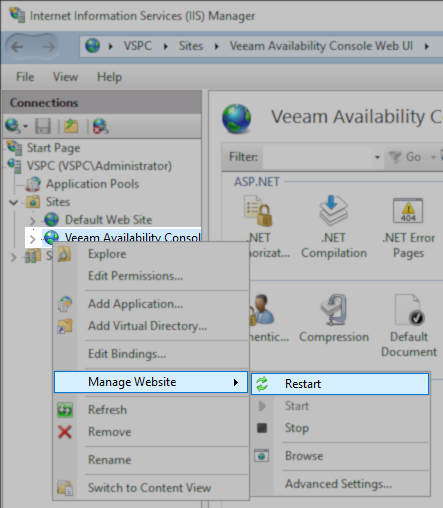
More Information
Known Limitation
- Labels can only be changed for the main UI, not yet for the plugins.
Example
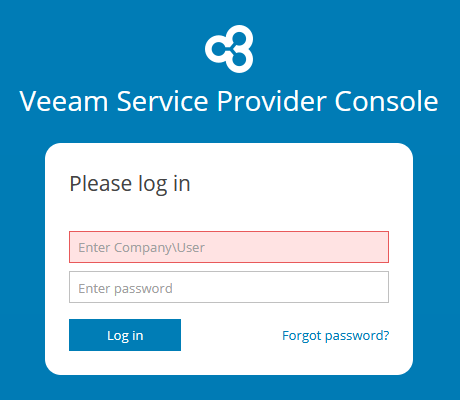
PLEASE_LOG_IN: 'Please log in',
USERNAME_TEXTFIELD_PLACEHOLDER: 'Enter Company\\User',
ENTER_PASSWORD: 'Enter password',
LOG_IN: 'Log in',
FORGOT_PASSWORD: 'Forgot password',
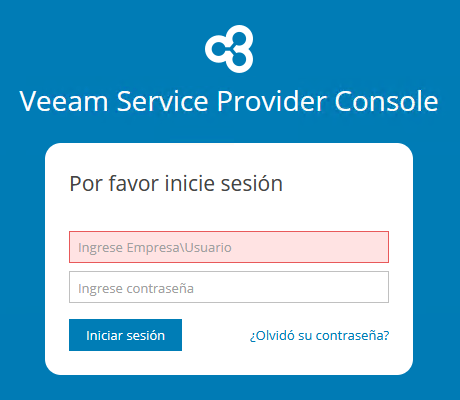
PLEASE_LOG_IN: 'Por favor inicie sesión',
USERNAME_TEXTFIELD_PLACEHOLDER: 'Ingrese Empresa\\Usuario',
ENTER_PASSWORD: 'Ingrese contraseña',
LOG_IN: 'Iniciar sesión',
FORGOT_PASSWORD: '¿Olvidó su contraseña?',
If this KB article did not resolve your issue or you need further assistance with Veeam software, please create a Veeam Support Case.
To submit feedback regarding this article, please click this link: Send Article Feedback
To report a typo on this page, highlight the typo with your mouse and press CTRL + Enter.
Spelling error in text

KB Feedback/Suggestion
This form is only for KB Feedback/Suggestions, if you need help with the software open a support case