Option to Add Veeam Kasten for Kubernetes Does Not Appear in Veeam Backup & Replication
| KB ID: | 4618 |
| Product: |
Veeam Backup & Replication | 12 | 12.1 | 12.2 | 12.3 | 12.3.1 | 12.3.2 | 13 | 13.1 Veeam Kasten for Kubernetes |
| Published: | 2024-06-13 |
| Last Modified: | 2024-06-13 |

Get weekly article updates

Challenge
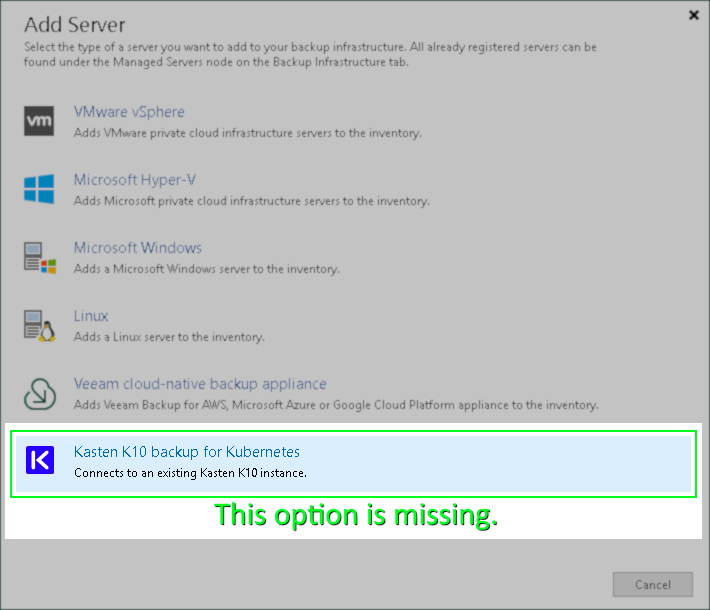
When attempting to add Veeam Kasten for Kubernetes to Veeam Backup & Replication, the option for Kasten does not appear in the Add Server options.
Cause
This issue may occur if:
- The Veeam Kubernetes Service is not running and needs to be started.
- The Kasten Plug-In is not installed.
This possibility is less common as the plug-in is now automatically installed alongside Veeam Backup & Replication.
Solution
- Connect to the Veeam Backup Server.
- Close the Veeam Backup & Replication Console.
- Verify that the Veeam Kubernetes Service service is present and running.
- If the service is missing, mount the Veeam Backup & Replication ISO, and install the VeeamKasten plugin packages from "X:\Plugins\Kasten\"
- If the service is present but not running, Start the service.
Note: If the service fails to start with "Error 1064", review KB4427.
- Reopen the Veeam Backup & Replication Console and check if the option to add Veeam Kasten for Kubernetes is now avaialble.
If this KB article did not resolve your issue or you need further assistance with Veeam software, please create a Veeam Support Case.
To submit feedback regarding this article, please click this link: Send Article Feedback
To report a typo on this page, highlight the typo with your mouse and press CTRL + Enter.
