Granular sudo Permissions for Veeam Plug-in for Proxmox VE
| KB ID: | 4701 |
| Product: |
Veeam Backup & Replication | 12.3 | 12.3.1 | 12.3.2 | 13 | 13.1 Veeam Plug-In for Proxmox VE |
| Published: | 2025-02-24 |
| Last Modified: | 2026-07-30 |


Purpose
Solution
Critical Details Before You Begin
- Review all Considerations and Limitations in the user guide!
Most noteworthy:- Veeam Plug-in for Proxmox VE supports only the
/bin/bashshell to perform management operations with the Proxmox VE server.
- Veeam Plug-in for Proxmox VE supports only the
- Proxmox VE does not include the
sudopackage and associated command by default; it must be installed manually (installation and configuration documented below). - Veeam Plug-in for Proxmox VE supports sudo version 1.9.10 or newer.
- The capability to add Proxmox VE to Veeam Backup & Replication using a non-root sudo user requires at least Veeam Plug-in for Proxmox VE version 12.1.3.197 and Veeam Backup & Replication 12.3 or newer.
Install and Configure sudo
While the installation and configuration of third-party applications is generally considered outside the scope of Veeam Support, Veeam has elected to provide this guidance as a courtesy to help ensure a smooth implementation of granular permissions. Please note that this configuration method is just one of many possible ways to use sudo to achieve the desired result. We recommend consulting with your Proxmox administration or security team to determine whether your organization has a preferred methodology for configuring sudo.
The following steps should be performed on the Proxmox host while logged in as the root user.
- Use the following command to check whether
sudois installed and, if so, which version is installed.
Veeam Plug-in for Proxmox VE requires at least sudo version 1.9.10.
- If
sudois not already installed, use the following command to install the latest version ofsudo:
- Use the following command to create a dedicated user account that will be used by Veeam Backup & Replication:
For this article, the account name used isveeamdep.
- Create the granular sudoers file using the following command:
/etc/sudoers.d/veeamdep should contain the following:
- Review the primary sudoers configuration file and ensure the following line is uncommented:
includedir /etc/sudoers.d
Use the following command to edit the/etc/sudoersfile:
- Run the following command to ensure that the
dmidecodepackage is installed:
Create a Dedicated Proxmox User for Veeam
- Within the Proxmox configuration, add the same user name from Step 3 to the Datacenter.
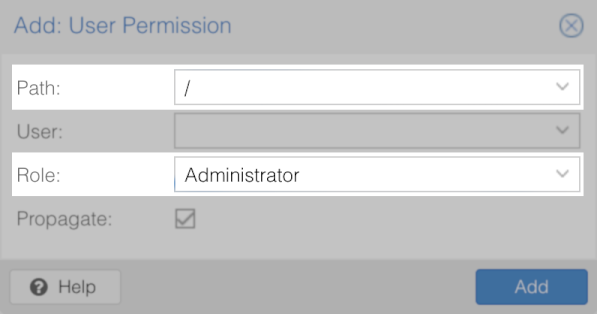
Datacenter > Permissions > Users > Add - Add the Administrator role for the root path ( Path: / ) to that user.
Datacenter > Permissions > Add > User Permission
Configure Proxmox Credentials within Veeam Backup & Replication
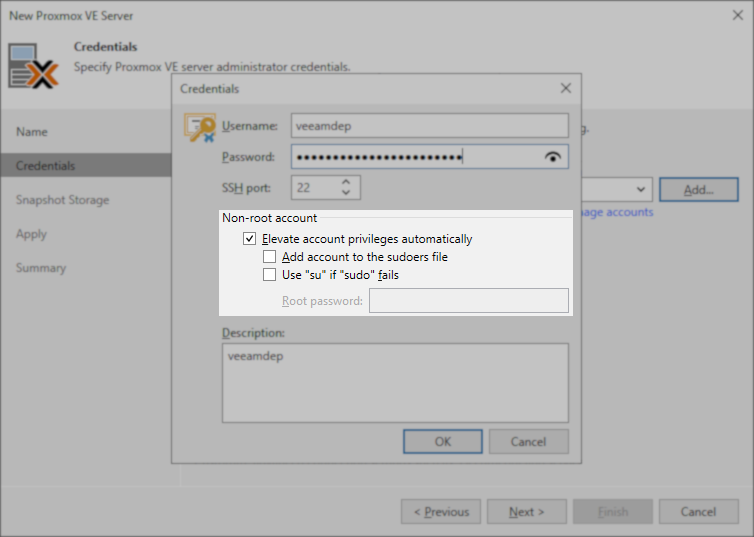
Configure Veeam Backup & Replication to connect to the Proxmox VE server using the new account.
The "Elevate account privileges automatically" option must be selected.
Note: For security reasons, the Veeam Plug-in for Proxmox VE ignores the Add account to the sudoers file and Use "su" if "sudo" fails options.
Common Errors
- The following error may appear if dmidecode is not installed (Step 6 above):
Make sure the specified user has sufficient permissions to execute dmidecode on the Proxmox VE server
- The following error may appear if the user is not configured in Proxmox (Step 7 above):
The provided credentials are invalid
Several recent cases where customers configured granular permissions and faced issues with connecting to the Proxmox VE environment were caused by either incorrectly configured sudo permissions (e.g., wrong username specified in the sudoers file) or missing or incorrect sudo configuration on the Proxmox VE host.
Please create a support case if issues persist after double-checking the sudoers file and sudo configuration.
If this KB article did not resolve your issue or you need further assistance with Veeam software, please create a Veeam Support Case.
To submit feedback regarding this article, please click this link: Send Article Feedback
To report a typo on this page, highlight the typo with your mouse and press CTRL + Enter.
Spelling error in text

KB Feedback/Suggestion
This form is only for KB Feedback/Suggestions, if you need help with the software open a support case