How to use Veeam Live OS ISO
| KB ID: | 4761 |
| Product: | Veeam Backup & Replication | 13 |
| Published: | 2025-09-03 |
| Last Modified: | 2026-09-15 |


Purpose
Solution
Downloading Veeam Live OS ISO
Booting Veeam LiveOS ISO
If the Host Manager is unavailable and you require root access to the Veeam Software Appliance OS, you can regain access to the system using Veeam LiveOS as a last resort.
- Mount the Veeam LiveOS ISO to the Veeam Software Appliance machine.
- Reboot the machine and boot from the ISO.
- Start the Veeam Live Environment.
- Log in with the following credentials:
- Username: root
- Password: veeam
Useful Commands in Veeam Live Environment
Enable SSH (Optional)
To start the SSH server, execute the following command:
Notes:
- Enabling SSH is optional and only needed if access to the Veeam Live Environment via SSH from a remote system is desired.
- Depending on the network and DHCP configuration of the environment, the Veeam LiveOS may not automatically join the network. In such a situation, use the
nmtuicommand to configure network settings.
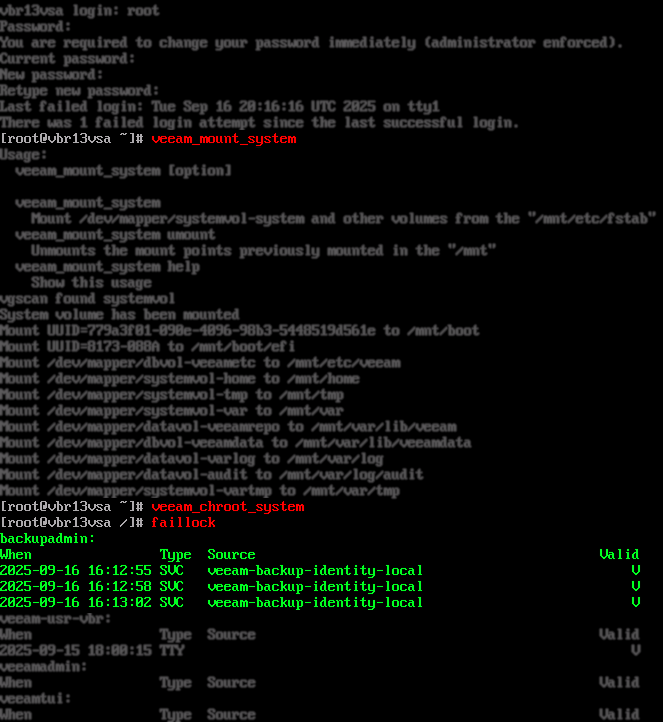
Mount Filesystem
To mount the Veeam Software Appliance filesystem for access in the Veeam Live environment, execute the following command:
Chroot
To chroot into the mounted Veeam Software Appliance filesystem, execute the following command:
Note: The filesystem must be mounted using veeam_mount_system first!
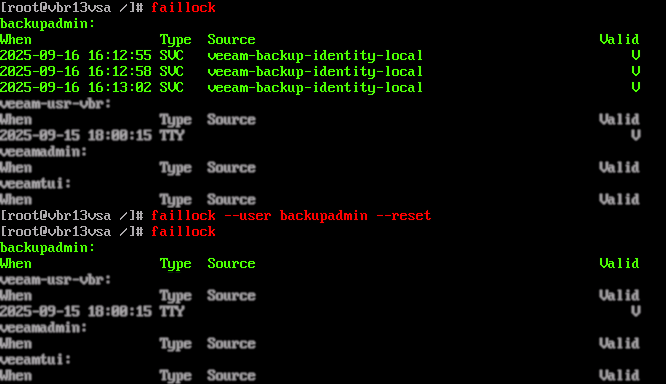
Common Veeam Live Environment Tasks

If this KB article did not resolve your issue or you need further assistance with Veeam software, please create a Veeam Support Case.
To submit feedback regarding this article, please click this link: Send Article Feedback
To report a typo on this page, highlight the typo with your mouse and press CTRL + Enter.
Spelling error in text

KB Feedback/Suggestion
This form is only for KB Feedback/Suggestions, if you need help with the software open a support case