Fixing Restore Failures Due to QEMU Machine Version
| KB ID: | 4773 |
| Product: | Veeam Backup & Replication | 12.3.2 |
| Published: | 2025-09-23 |
| Last Modified: | 2025-09-29 |

Get weekly article updates

Challenge
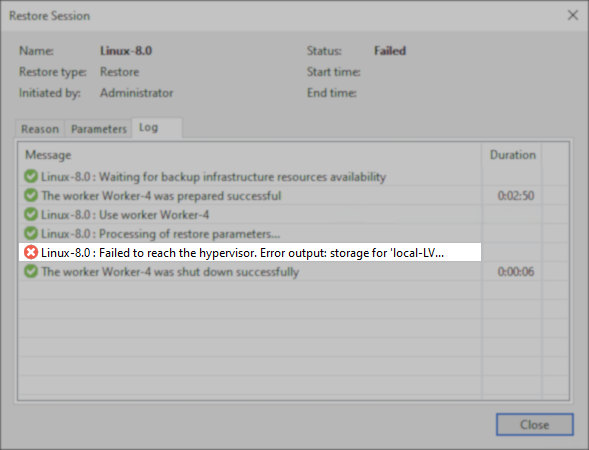
When attempting to restore a VM with a QEMU version lower than 10 and disks in QCOW2 format to a Proxmox VE v9 node, the following error occurs:
16.09.2025 10:25:28 Error Linux-8.0 : Failed to reach the hypervisor. Error output: storage for 'local-LVM:vm-42-disk-1.qcow2' is configured for snapshots as a volume chain - this requires QEMU machine version >= 10.0. See https://pve.proxmox.com/wiki/QEMU_Machine_Version_Upgrade
Cause
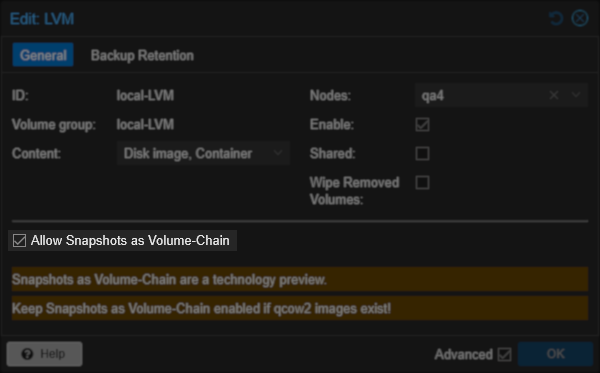
This occurs when the restore destination storage has the setting "Allow Snapshots as Volume-Chain" enabled, causing the storage to require VMs on that storage to be QEMU version 10.
Solution
To workaround this issue, consider one of the following options:
- Restore to another storage that has Allow Snapshots as Volume-Chain disabled.
- Restore the disk as RAW.
- After the restore, if needed, convert the disk back to QCOW format manually inside Proxmox.
See https://pve.proxmox.com/wiki/Storage_Migration. - Consider your use case before choosing to restore to RAW format.
While conversion to QCOW2 is possible using the Move Disk function, it may require updating the VM's QEMU version. This can cause compatibility issues. Therefore, disk format conversion should be done with caution.
- After the restore, if needed, convert the disk back to QCOW format manually inside Proxmox.
If this KB article did not resolve your issue or you need further assistance with Veeam software, please create a Veeam Support Case.
To submit feedback regarding this article, please click this link: Send Article Feedback
To report a typo on this page, highlight the typo with your mouse and press CTRL + Enter.
Spelling error in text

KB Feedback/Suggestion
This form is only for KB Feedback/Suggestions, if you need help with the software open a support case