- Veeam Support Knowledge Base
- Tape library and drives are shown as separate devices
Tape library and drives are shown as separate devices
| KB ID: | 1842 |
| Product: | Veeam Backup & Replication | 9.5 | 10 | 11 | 12 | 12.1 | 12.2 | 12.3 | 12.3.1 | 12.3.2 | 13 | 13.1 |
| Published: | 2013-12-05 |
| Last Modified: | 2025-03-28 |

Cheers for trusting us with the spot in your mailbox!
Now you’re less likely to miss what’s been brewing in our knowledge base with this weekly digest

Oops! Something went wrong.
Please, try again later.
Challenge
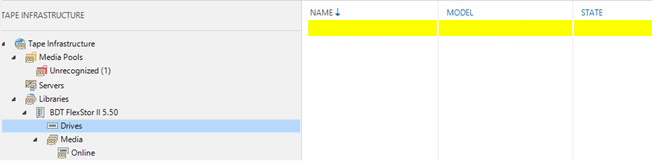
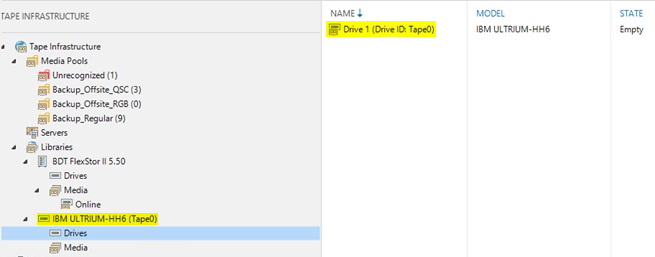
Cause
- The tape library is not reporting the tape drive serial number.
- The tape library has one or more unpopulated tape drive bays.
Solution
The following registry value may be added on the Veeam Backup Server to manually map the tape drive(s) to the tape library.
Key Location: HKLM\SOFTWARE\Veeam\Veeam Backup and Replication\
Value Name: TapeDevices
Value Type: Multi-String Value (REG_MULTI_SZ)
Value Data:
TapeServerName
Changer#=Tape#:ElementAddress
Collecting Information to populate Value Data:
The Value data consists of two lines. The first declares which tape server should be affected, and the second declares the identifier for the Tape Library and associated Tape Drive(s).
Line 1:
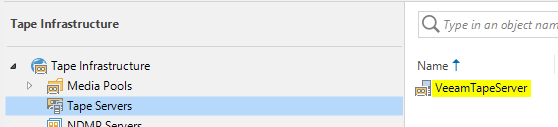
Use the tape server's name shown in the Veeam Backup & Replication Console under Tape Infrastructure > Servers.
Line 2:
- Connect to the Tape Server where the Tape Library and Drives are attached.
- Open an Administrative Command Prompt
- Change directory to a temporary folder (e.g., cd C:\Temp\)
- Run the following command to dump information from the Veeam Tape Service.
The command will complete silently, leaving in the folder a file named "dumpinformation.xml"
For Veeam Backup & Replication 11a and older use:
"C:\Program Files (x86)\Veeam\Backup Tape\VeeamTapeSvc.exe" -dump"C:\Program Files (x86)\Veeam\Backup Tape\VeeamTapeSvc.exe" --dump > dumpinformation.xml- Open "
dumpinformation.xml" in an XML editor. (alternatively, open the file in a web browser) - Using the info at the end of the file, identify the following information:
- DeviceName for the changer
- DeviceName of the drive(s)
- Respective ElementAddress of the drive(s) associated with the Changer
Use the SerialNumber value(s) to correlate the ElementAddress

DF50A00001 and a drive can be seen associated with the changer that has the same SerialNumber.- Using the examples above, the resulting "Value data" would be:
VeeamTapeServer
Changer0=Tape1:0,Tape2:1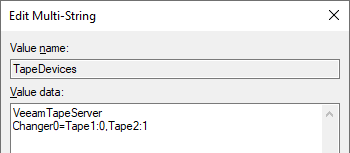
If this KB article did not resolve your issue or you need further assistance with Veeam software, please create a Veeam Support Case.
To submit feedback regarding this article, please click this link: Send Article Feedback
To report a typo on this page, highlight the typo with your mouse and press CTRL + Enter.
