Upgrading Veeam Data Platform from Socket to Veeam Universal License (VUL) Licensing
| KB ID: | 4550 |
| Product: |
Veeam Data Platform Veeam Backup & Replication |
| Published: | 2024-02-15 |
| Last Modified: | 2025-10-07 |


Purpose
Solution
License Upgrade Benefits
If you are currently operating Veeam Backup & Replication with a socket-based license, converting to the flexible Veeam Universal License (VUL) will unlock all the current and future benefits of VUL, including:
- Flexibility to launch secure, pre-hardened backup environments in moments with the Veeam Software Appliance—reducing management, security, and patching headaches.
- Native hypervisor support for Nutanix AHV, Proxmox VE, Scale Computing HyperCore, Oracle Linux KVM, and Red Hat Virtualization.
- Flexible and straightforward per-workload licensing for Veeam Data Platform.
- Tight integrations with security platforms, including Splunk, Palo Alto Networks, CrowdStrike, and more.
- Support for IaaS and PaaS offerings from AWS, Microsoft Azure, and Google Cloud.
- Backup of NAS file shares and object storage.
- Centralized management and protection for physical Windows and Linux servers or workstations.
- Centralized management and protection for Oracle RMAN, SAP HANA, SAP on Oracle, and Microsoft SQL Server.
- Protection and granular recovery for Microsoft Entra ID.
Customers who are on Standard or Enterprise socket licenses can additionally gain access to:
- Advanced threat detection tools, such as Veeam Threat Hunter, IoC Tools Scanner, and our suite of inline and post-backup malware detection capabilities.
- Enhanced platform-level security through four-eyes authorization and KMS integrations.
- Instant database recovery for Microsoft SQL Server and Oracle databases, as well as MongoDB workload protection with streamlined granular recovery.
For more information, please review the Veeam Universal License FAQs.
Upgrading Your License From Socket to VUL
To migrate from a socket-based license to the Veeam Universal License (VUL):
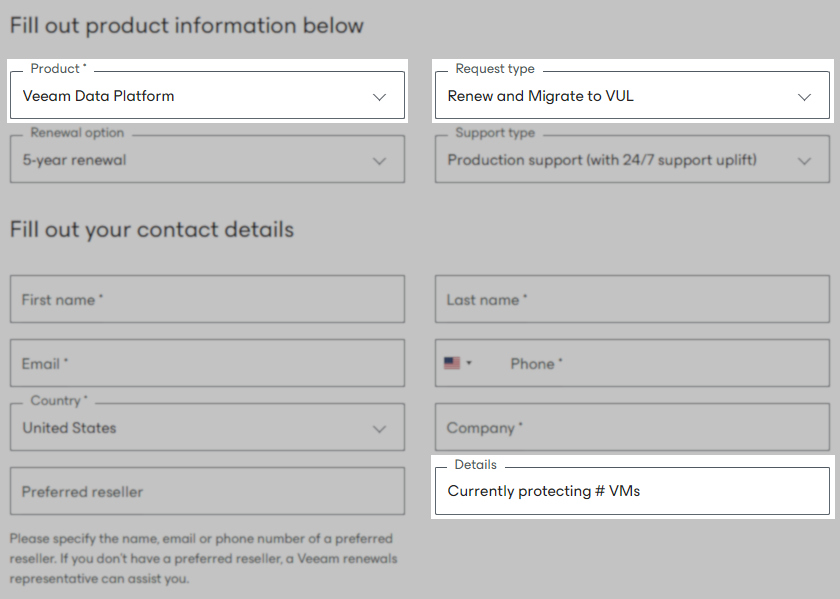
- Submit a request via the Renewal Request form.
- In the Product field, select Veeam Data Platform.
- For the Request type, select Renew and Migrate to VUL.
- In the Details field, specify the number of VMs currently protected with your socket-based licenses.
Providing this detail will help the Veeam Customer Success team process your renewal request.
- Once the form is submitted, the Veeam Customer Success team will review your configuration and work with your chosen reseller to provide a quote. This will include the VUL migration cost, future renewal costs, and any pricing adjustments based on your current license edition.
Downloading Your VUL License
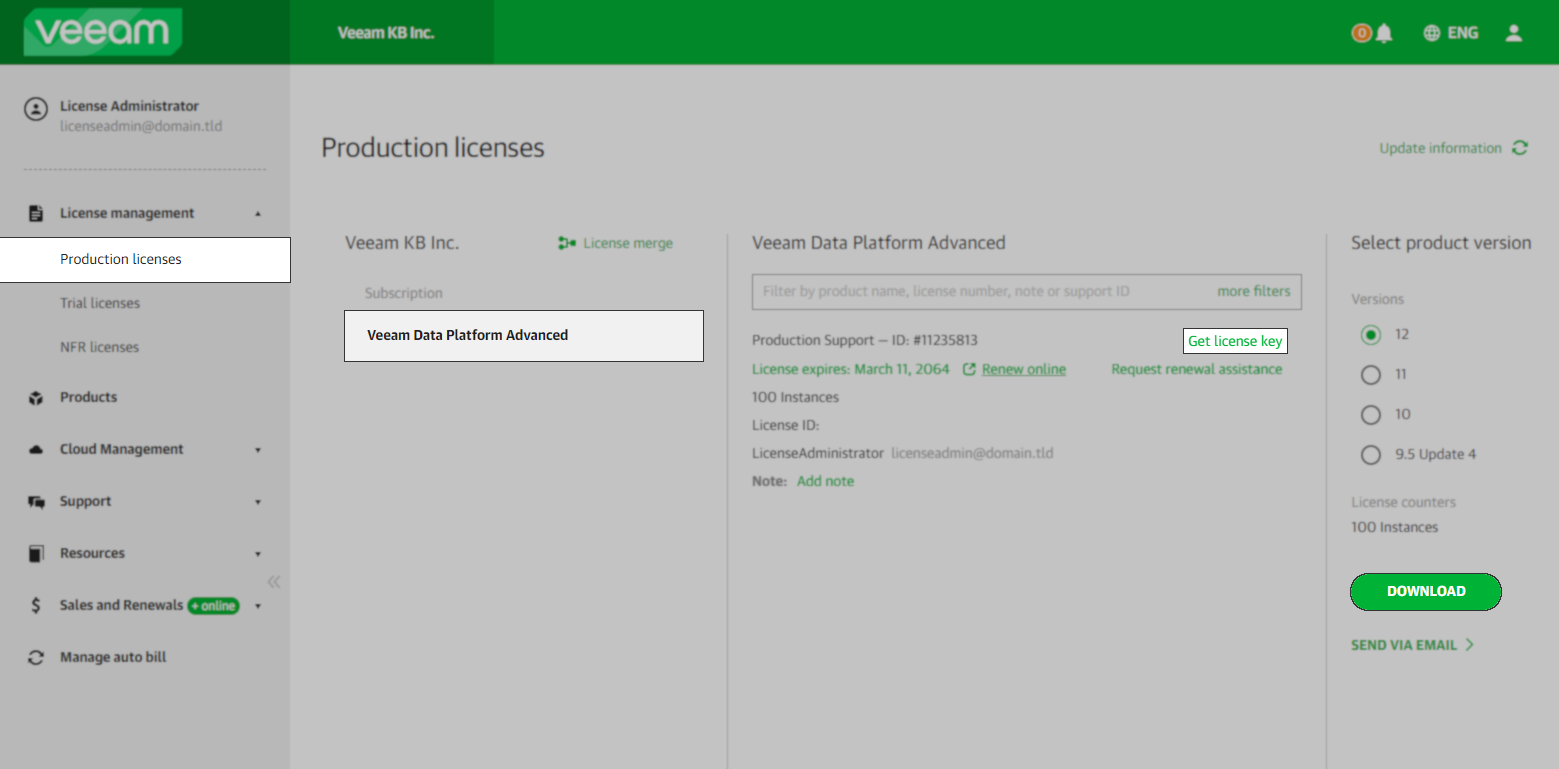
After upgrading to VUL, the License Administrator can download the new license files from the Production Licenses section of the My Account portal.
Note: If you have multiple subscription licenses, please review KB3116 for information about merging licenses.
Replacing Socket-Based License with VUL in Veeam Backup & Replication
Note: If the Veeam Backup & Replication deployment is managed by Veeam Backup Enterprise Manager, you will be prompted when attempting to remove the license via the Veeam Backup & Replication console. If this occurs, you must open and perform the license replacement within the Veeam Backup Enterprise Manager. There, you will install the new VUL license and then remove the socket-based license. This change will be propagated to all managed Veeam Backup & Replication servers.
To ensure all VUL functionalities are available, you must ensure that only the VUL license is installed. Combining the old socket-based license with the VUL license file will result in certain limitations being applied to VUL functionalities.
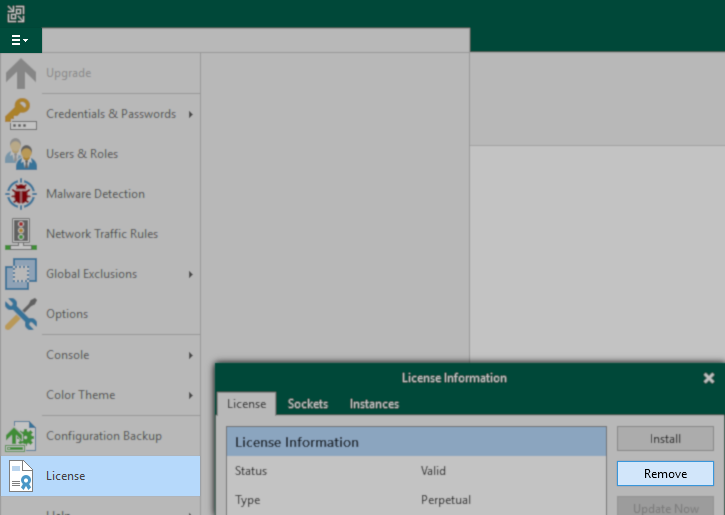
- Within the Veeam Backup & Replication Console, Remove the old Socket-based license.
This will temporarily revert the software to Community Edition.
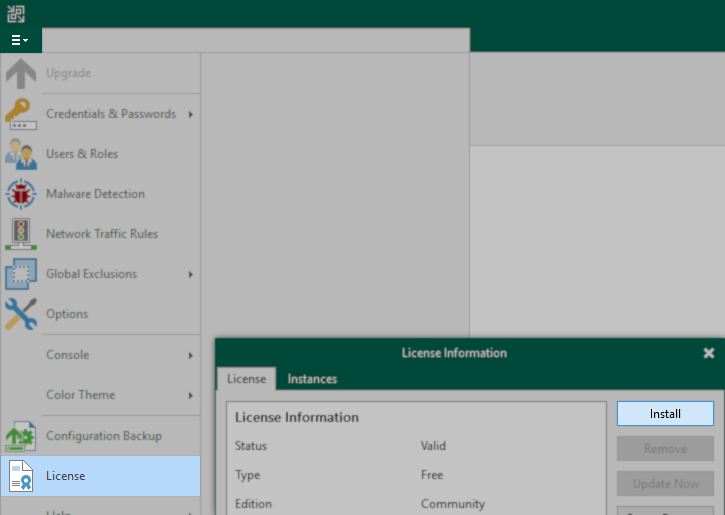
- Install the new Veeam Universal License.
If this KB article did not resolve your issue or you need further assistance with Veeam software, please create a Veeam Support Case.
To submit feedback regarding this article, please click this link: Send Article Feedback
To report a typo on this page, highlight the typo with your mouse and press CTRL + Enter.
Spelling error in text

KB Feedback/Suggestion
This form is only for KB Feedback/Suggestions, if you need help with the software open a support case