- Veeam Support Knowledge Base
- Veeam Backup & Replication Console Fails to Open After a Hostname Change
Veeam Backup & Replication Console Fails to Open After a Hostname Change
| KB ID: | 2350 |
| Product: | Veeam Backup & Replication | 12.1 |
| Published: | 2017-10-05 |
| Last Modified: | 2026-04-07 |
| Languages: | JP |

Cheers for trusting us with the spot in your mailbox!
Now you’re less likely to miss what’s been brewing in our knowledge base with this weekly digest

Oops! Something went wrong.
Please, try again later.
This article very specifically applies to Veeam Backup & Replication using the installer-deployed Microsoft SQL Server Express instance. After changing the Veeam Backup Server hostname, the SQL connection settings in the registry may still reference the old hostname.
Starting in VBR v12, the default install used PostgreSQL, which specifies localhost as the connection host to prevent hostname change issues. However, hostname changes can still affect local account usage, as documented in KB4542.
Other Console connection issues are covered in KB2127.
Challenge
After changing the hostname of the Veeam Backup Server, the Veeam Backup & Replication Console fails to connect, displaying the error:
No connection could be made because the target machine actively
refused it 127.0.0.1. Make sure the backup server you are connecting with
is X.Y version.
The error message displayed by the Veeam Backup & Replication Console mentions a potential version incompatibility because the console assumes that it cannot contact port 9420 because the wrong version is installed. In fact, the reason it cannot reach port 9420 is that the Veeam Backup Service service has failed to start.

When the Veeam Backup & Replication Console fails to launch in this manner, you will find that the Veeam Backup Service is stopped and cannot be restarted. The diagnostic logging on the Veeam Backup Server will contain the following messages, which show that the service is attempting to connect to the SQL Server Instance using the previous hostname.
%programdata%\Veeam\Backup\Svc.VeeamBackup.log:
 Info (3)    [MSSQL] Connecting to SQL Server (CurrentUser=[NT AUTHORITY\SYSTEM], ServerInstance=[oldhostname\VEEAMSQL2016], Options=[Master], Environment=[Default])
Error (3)    [MSSQL] Failed to connect to server oldhostname\VEEAMSQL2016. (Microsoft.SqlServer.Management.Common.ConnectionFailureException)
Error (3)    [MSSQL] A network-related or instance-specific error occurred while establishing a connection to SQL Server. The server was not found or was not accessible. Verify that the instance name is correct and that SQL Server is configured to allow remote connections. (provider: SQL Network Interfaces, error: 26 - Error Locating Server/Instance Specified) (System.Data.SqlClient.SqlException)
Cause
Solution
To correct this issue, follow the steps below to update the Veeam Backup & Replication configuration to use either localhost or the new hostname:
- Open the Configuration Database Connection Settings program, which should appear in the start menu of the Veeam Backup & Replication server.
- Within this program, select Veeam Backup and Replication, then click Next.
(If Enterprise Manager is not installed, you will not be prompted to select a product.) - Adjust the value specified in the Server name field to match the correct hostname.
Note: Use either localhost or the new hostname. - Click Next, and Veeam will connect to the database. Wait for this process to complete.
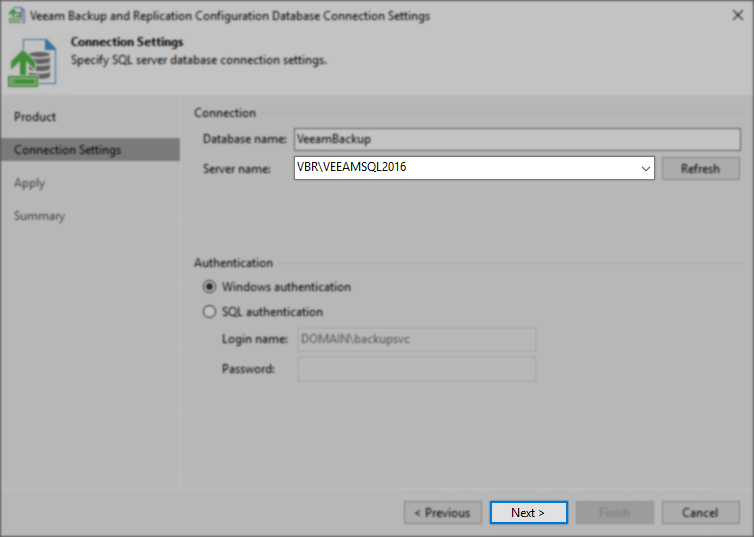
- Click Next, and the Veeam service will be started.
Note: If prompted to restart other services, click Yes. - When this has been completed, click Finish, then try accessing the Veeam Backup & Replication Console.
More Information
- If you have any problems following these steps, please contact Veeam Support.
- Troubleshooting for issues opening the console when the hostname has not changed are available in KB2127.
- Hostname changes of other devices, such as hypervisors, repositories, or proxies, require additional steps covered in KB1905.
If this KB article did not resolve your issue or you need further assistance with Veeam software, please create a Veeam Support Case.
To submit feedback regarding this article, please click this link: Send Article Feedback
To report a typo on this page, highlight the typo with your mouse and press CTRL + Enter.
Spelling error in text

Thank you!
Your feedback has been received and will be reviewed.
Oops! Something went wrong.
Please, try again later.
You have selected too large block!
Please try select less.
KB Feedback/Suggestion
This form is only for KB Feedback/Suggestions, if you need help with the software open a support case
Thank you!
Your feedback has been received and will be reviewed.
Oops! Something went wrong.
Please, try again later.