- Veeam Support Knowledge Base
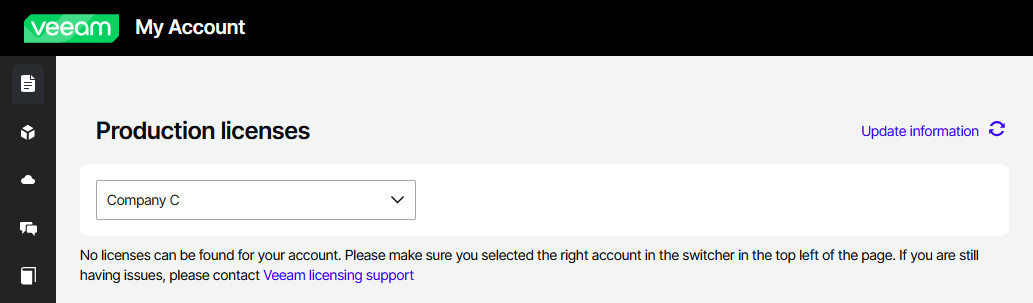
- My Account Portal: "No licenses can be found for your account"
My Account Portal: "No licenses can be found for your account"

Challenge
Solution
This issue often happens for one of two reasons:
- There are multiple companies linked to your Veeam Account, and you may need to switch which company's licenses you are viewing.
or - Your Veeam Account isn't properly associated with your company on the backend.
Check Company Switcher
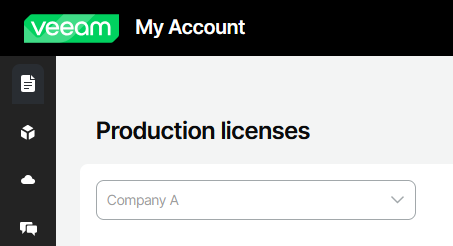
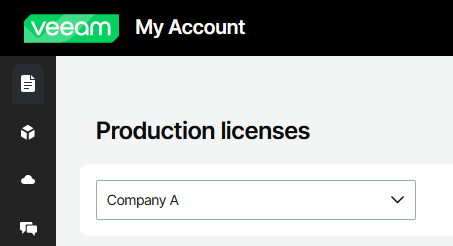
In the Production Licenses view, you will see a box showing the company whose licenses you are viewing.
- If the company name in the box is greyed out, it means you are only associated with that company.
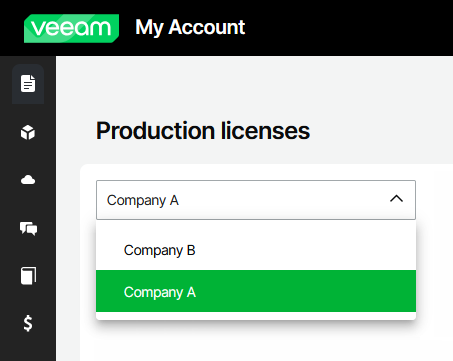
- If the text is black and the dropdown is active, you can click the company name to select and view licenses for a different associated company.
Create Case for Assistance with Associating Account
If after switching companies with the selector you are still unable to see the licenses you are expecting, or there are no other accounts to switch to, please create a Licensing Support case and include the following information:
- Email address that is associated with your Veeam Account.
- Support ID of the license that you are expecting to to see in the My Account portal.
- Name of the company for which the license is associated.
More Information
The License Management section of the My Account portal has a minimum browser width requirement. If you attempt to view this section with a browser that is too narrow or if the page is zoomed in excessively, you will encounter the following message:
This functionality is unavailable on mobile devices. Please switch to the desktop.
This issue can occur even when you are not viewing the page on a mobile device. To resolve this, you can either widen your browser window, zoom out, or switch to a browser on a device with a higher screen resolution.
If you do not work for the company you are attempting to view licenses for (or may be listed under a different office), you will need to ask the License Administrator to assign you as a Case Administrator. Please review https://www.veeam.com/kb2211
If you are a Veeam ProPartner attempting to manage licenses or create cases on behalf of your customer, please review: https://www.veeam.com/kb2836
Related Articles
- Veeam Account Sign In FAQ
- How to Create a Veeam Account
- Veeam My Account Portal - MFA Guide
- My Account Portal "Recovery email for case contact" Guide
- My Account Portal - Role Management FAQ
- How to Create a Veeam Support Case
- My Account Portal: "No licenses can be found for your account"
- How to Attach Files to a Veeam Support Case
- How to Attach a File Larger Than 5GB to a Support Case
- How to Generate an SFTP Account for a Support Case
- How to Contact Veeam Support Management
- Support Partners Case Management
If this KB article did not resolve your issue or you need further assistance with Veeam software, please create a Veeam Support Case.
To submit feedback regarding this article, please click this link: Send Article Feedback
To report a typo on this page, highlight the typo with your mouse and press CTRL + Enter.
Spelling error in text

Thank you!
Your feedback has been received and will be reviewed.
Oops! Something went wrong.
Please, try again later.
You have selected too large block!
Please try select less.
KB Feedback/Suggestion
This form is only for KB Feedback/Suggestions, if you need help with the software open a support case
Thank you!
Your feedback has been received and will be reviewed.

Oops! Something went wrong.
Please, try again later.